
When you have an active log you have the opportunity to create multiple sub-incidents, connected to your main log. It can be useful to use sub-incidents in RAYVN whenever you need to handle multiple incidents related to your situation.
You can assign different teams to each sub-incident, and each sub-incident will have its own log feed. The main log will still work as a primary feed with all the communication going on in the log, and in the individual sub-incident feeds.
Examples of uses of sub-incidents:
Main log - Hurricane in the city harbor
| Incident | Title | Assigned teams |
| 1 | Secure cruise ships | Team A & B |
| 2 | Flooding in the city center | Team C & D |
| 3 | Media Management | Team E |
| 4 | Assist boat to get to the harbor | Team B |
*Persons invited to the main log will have access to all communication related to the entire situation
Main log - Music festival
| Incident | Title | Assigned teams |
| 1 | Missing person | All security teams |
| 2 | Injured person | Medical team |
| 3 | Crowd management | Security team 1 & 2 |
| 4 | Power outage at the stage area | Tech team |
*Persons invited to the main log will have access to all communication related to the entire situation
Sub-incident types
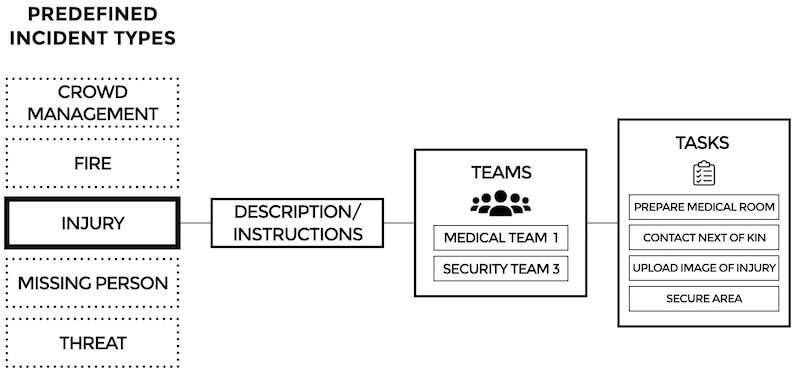
Additionally, you can create sub-incident templates. If you have recurring sub-incidents, you can add them as an sub-incident type, and add specific teams and tasks to that specific sub-incident type. For example, a store can have a sub-incident type called "Store theft." The template can automatically invite Security teams and management and have a standard list of tasks to secure that a standard procedure is followed.
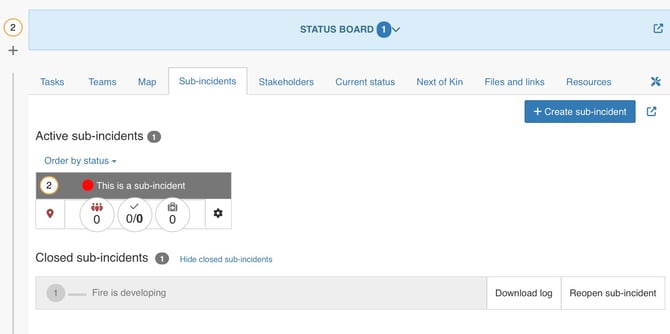
Status of all ongoing sub-incidents
If you click the sub-incidents tab you can see a list of all ongoing and closed sub-incidents. The list is ordered based on severity. Whenever a specific sub-incident has been handled, you can easily close it, leaving only the incidents that demand your attention open.
You can click the corresponding number to each sub-incident to open the specific log feed and task list for that sub-incident.
When using sub-incidents you can:
- Get a status update of all ongoing and closed sub-incidents
- Create new sub-incidents
- Assign teams to handle the sub-incident
- Set the location of a specific sub-incident
- Add affected person(s)
- Check affected persons in and out of the sub-incident
- Close the sub-incident
- Run a report of the sub-incident
Read more about how to use the sub-incidents module in RAYVN.