
In some cases, it may be beneficial to aggregate your situation reports. For example, you may need to send an updated version of a report while keeping all the information from your initial report consistent in your subsequent report.
Note: You can also aggregate your reports with reports that you've received from stakeholders.
To aggregate a report with another report, click "Combine reports". Here you'll get the choice between creating a report without a template or a report from a template.
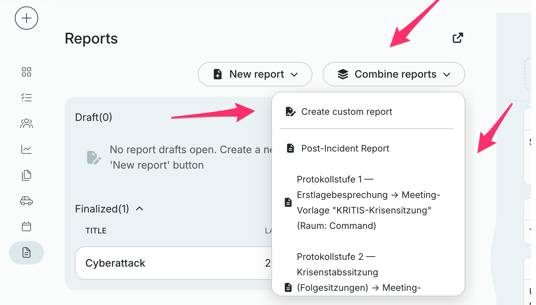
Next, select the reports you want to aggregate with the new report.
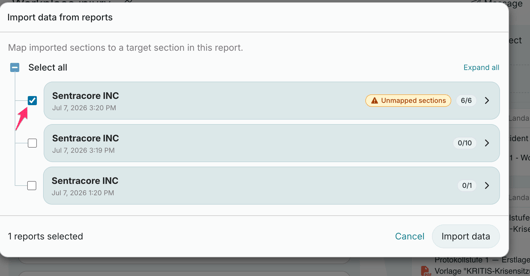
Then select the sections from the report you want to include. Note that you need to select a section in order to import the data. For each selected section, choose from a dropdown which section in your new report it should be mapped to. If none of the existing sections match, select "Add section: [section name]" to add it as a new section in your report instead.
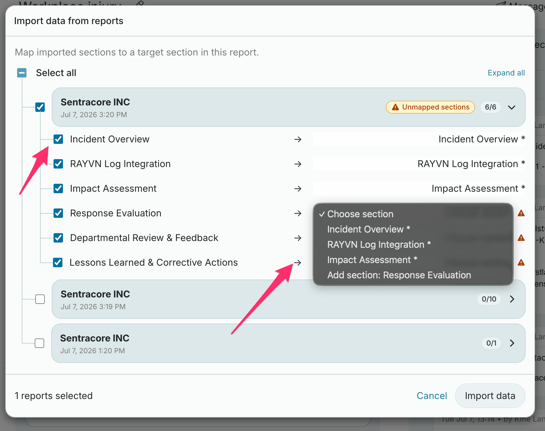
Then click "Import data".
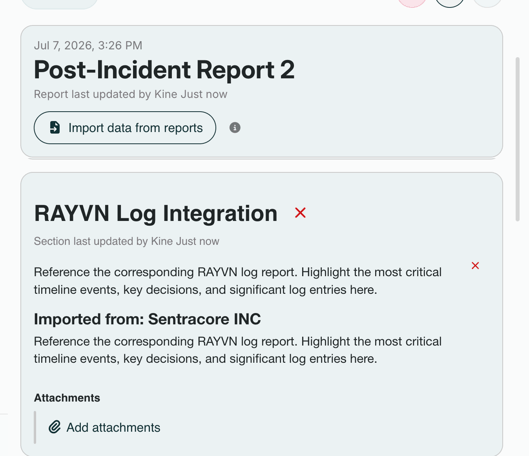
Once the report has been added, you'll be able to see the information from the other report copied into a normal, editable section in your new report, where you can continue to edit or add to it just like any other section. Here's an example:
When you open the PDF file of the finalized report, the reports will be displayed in chronological order.