
An API (application programming interface) can be used to make two or more different computer programs communicate with each other.
In RAYVN, the api solution comes as a separate module. Please reach out to us if you want to activate this module for your account.
How to manage API tokens in your account
Once the module is activated for your account you can create an API token in the account settings.
Note that to access the account settings, your user must have the "Account admin", or "group admin" access level.
In the account settings, click the arrow on the side of the group name, and click "Manage API tokens".
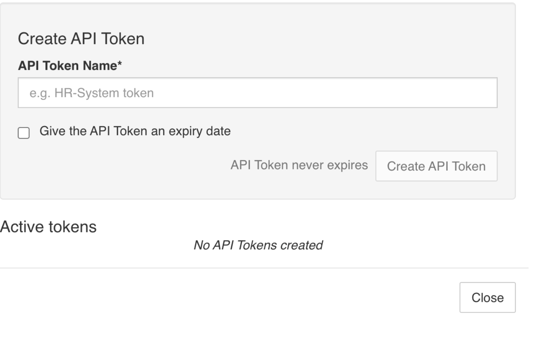
You'll then be shown a window where you can see all of your API tokens, and create new tokens.
Create a new token by giving it a name, and selecting an expiry date for the token (if necessary). If you don't set an expiration date, the token will never expire unless you delete the token.
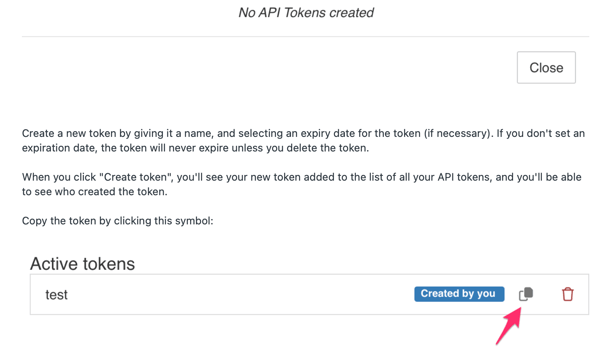
When you click "Create token", you'll see your new token added to the list of all your API tokens, and you'll be able to see who created the token.
Copy the token by clicking this symbol:

The token is now ready to be added to the API.
At the top of the window you'll see a link to the RAYVN API. Click here to be taken to Swagger.
Swagger is an open resource set of rules, specifications and tools for developing and describing REST APIs.
The API documentation is like a reference manual containing instructions about how to effectively use and integrate with an API.
In Swagger you can do CRUD operations on users, responders, contacts, contact lists and teams.
This documentation is intended for tech personnel.
This is our technical API Documentation where you Store the API-token that is created in RAYVN.
Select the button that says "Authorize".

Paste the token you copied before, click "Authorize", and close the dialogue.
Now, you've added the token and you can start working with the API.