
Editing a log entry lets you fix a mistake or clarify something after it's already been posted, instead of leaving it wrong in the feed. Every change is saved in a version history, so you can always see what was changed and by who.
If the Log entry editing functionality is activated in your account, the users in your account can edit any log entry in any log.
Note: To enable this functionality, you need access to the General settings. This is only available for users with the Account admin access level.
When the setting is enabled, you will find the option to edit a log entry the next time you select the three dots on the right side of the entry.
Editing an entry
To edit a log entry, click the three dots next to the entry, and select "Edit log entry".
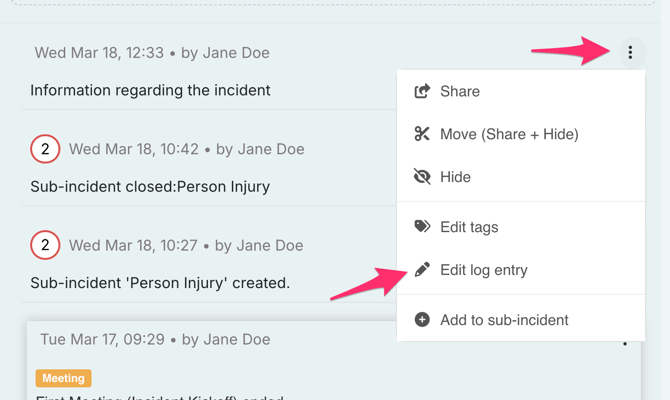
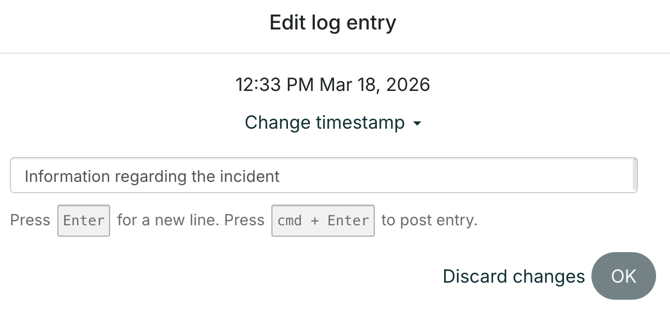
You can modify the text in the log entry, and change the date/time of the log entry.
Note: You cannot change the time/date to a newer time than now.
Show and hide version history
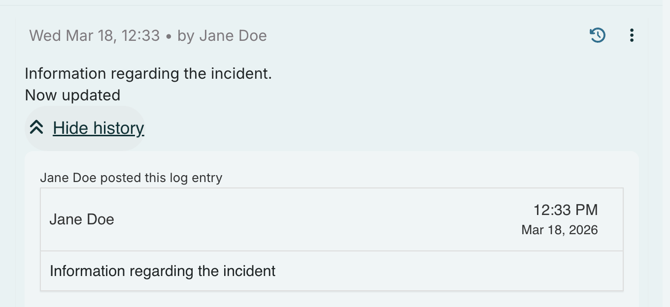
Every time you edit a log entry, a version history of the log entry will be created.
If you click "Show history" at the bottom of the log entry, you'll be able to see all prior versions of the log entry before the current version.
This is to ensure transparency, and make sure that important information is not lost.
You'll also be able to see when changes were made, and by whom the changes were made.
Click "Hide history" to collapse the version history view.
Note:
If you want to include a log entry in a Report, only the latest version of the log entry will be included.
When you download the log, all versions of the log entry will be included.
Edit tags
It's possible to edit the tags you've used for the log entry after the log entry is posted, but note that you can only change your own defined tags, and not RAYVNs "released information" or "Key event" tags.