
Exporting personnel lets you download information about users, responders, contacts, and contact lists as an Excel spreadsheet directly from Account Settings. This is useful when you need to use personnel data outside RAYVN. For example for reporting or keeping an offline overview of who is registered in your organization.
All exports are done in Account Settings.
What can be exported:
- Users
- Responders
- Contacts
- Contact lists
How to export?
- Go to the tab you wish to export (e.g users)
- Select the elements to be exported - one or multiple.
- Press Export.
- Download of the spreadsheet will start (converted to Excel).
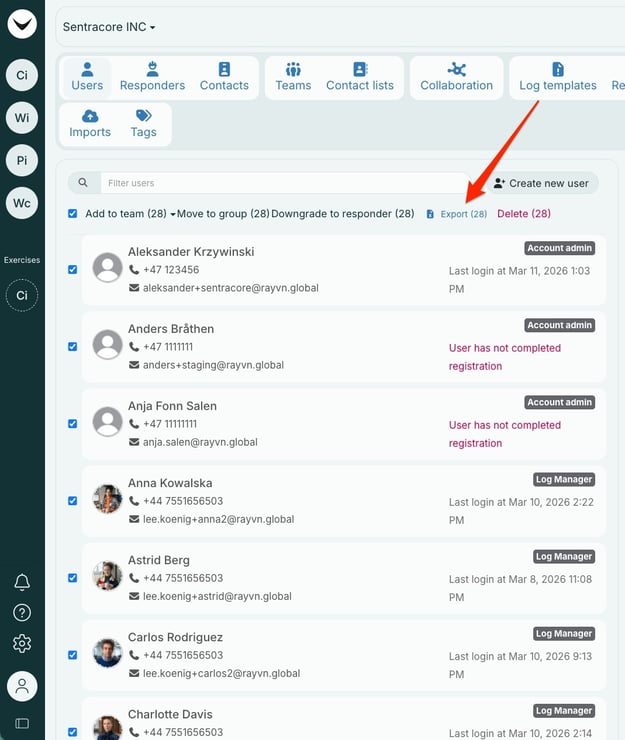
The export will contain different information, based on what content is exported (users, contact lists).
Below is an example of the information included in the Excel file when exporting users:
- First name
- Last name
- Title/role
- Secondary e-mail
- Country code
- Mobile
- Secondary country code
- Secondary mobile
- Last login
- User role
- Contact lists
- Custom fields (if in use)
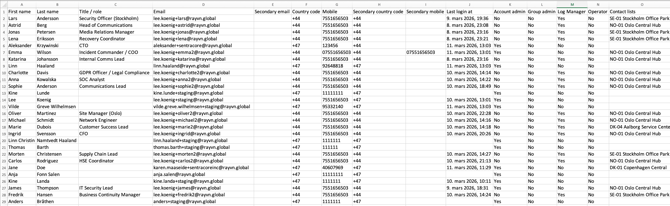
Screenshot of export.
The exported file(s) will be downloaded in your browser, and you can find it in the section for downloaded files on your computer.