
The status board is a feature in RAYVN which allows users to share current status values with stakeholders and make the current statuses visible at all times for everyone who uses the logs within that room.
To pin a status value to the board, all you have to do is:
- Go to the "Active Log" you have opened in RAYVN.
- Click on the "Current Status" field, and enter the status, and the value of the status you want to pin.
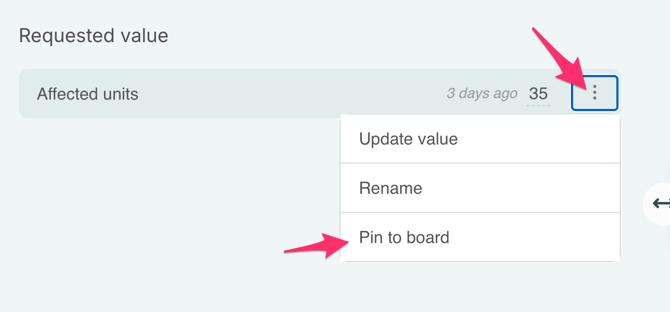
- Once you have entered the value of the status you want to pin, click the three small dots next to the value of the status field. Select "Pin to board".
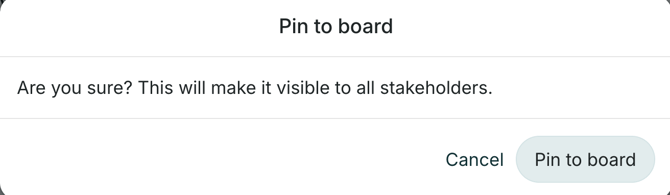
- When you pin something to the status board in your log, it will also be visible to your stakeholders. Be sure you want your stakeholders to see the information you are posting to the status board. RAYVN will ask you if you are sure you want to pin the value to the board.
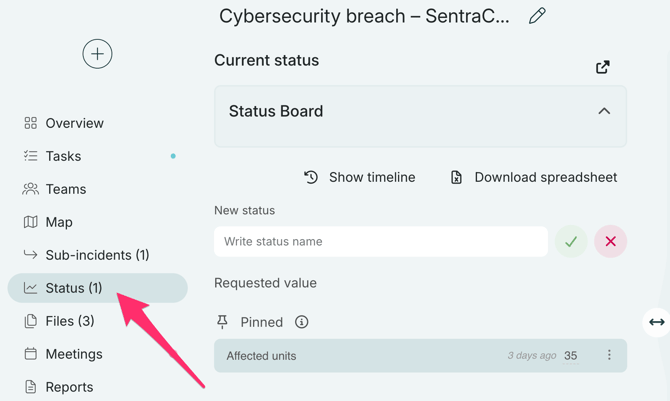
- Once you have pinned the status value to the board, it should look like this:
Here you can see who has pinned the value to the board, and when it was posted. You can always update the value as needed by clicking the three dots next to the value, and clicking "Update value".