
In October 2026, the RAYVN mobile app will get a new design. It is the same app you use today, and everything you do in the app still works. The app is now easier to use, and it looks and works more like the web app. In this article, you can read what is new, how to use the app now, and what you need to do.
What’s new
- The same look as the web app. Colours and buttons are the same as in the web app. If you already use the web app, you will feel at home quickly.
- More of the web app functionality on your phone. Everything you do in the app today still works. You can now also send messages, use the overview page and start meetings directly from the app.
- A faster way to add things. Use the + button to quickly add tasks, log entries and more.
How to use the app now
The start screen
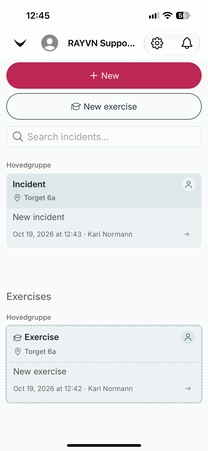
- The incidents you have access to are listed on the start screen. They are organised by type (Incident or Exercise) and by the group they were created in. You can use the search field to quickly find a specific incident.
- Settings and the notification bell are in the top right corner
Starting a new incident
The way you start a incident has changed. It is now the same as in the web app.
Tap + New to start a new incident, or New exercise to start an exercise. Then go through a few steps, one at a time:
- Template: choose a custom log or a log template.
- Incident: add a title and a notification text.
- Position: add where the incident is happening (can be skipped).
- Teams: choose which teams should be part of the incident (can be skipped).
- Tasks: add the tasks that need to be followed up (can be skipped).
- Summary: check what you have filled in, and start the incident.
If you have started incidents in the web app before, you will recognise these steps.
Inside a incident
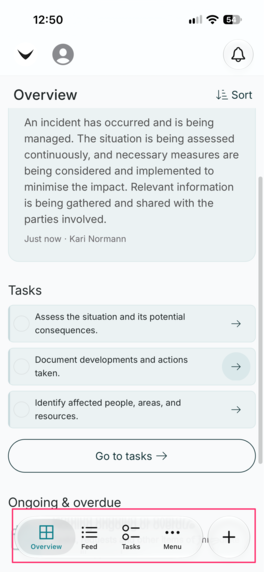
- The incident opens on the overview page, the same as in the web app. Here you see the situation description, what is ongoing or delayed, the status and the tasks.
- The menu at the bottom of the screen has shortcuts to feed and tasks.
- Tap Menu to open a side menu with the rest of the tools in the incident.
Adding something new
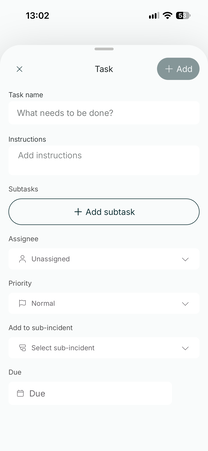
When you add something new, a window opens. This works the same way for all features. For example, when you add a task, you can fill in the task name, instructions, who it is assigned to, the priority and the due date.
What you still do in the web app
Some things are still only available in the web app: general settings, the privacy center, account settings and the archive.
What you need to do
You will only need to update the RAYVN app in the App Store or Google Play.