
In Feb./March of 2027 we will launch some new features in RAYVN which is created to make RAYVN more flexible and make notifying and mobilizing your personnel even more efficient.
In short there are three main areas that will have changes/new functionalities in RAYVN:
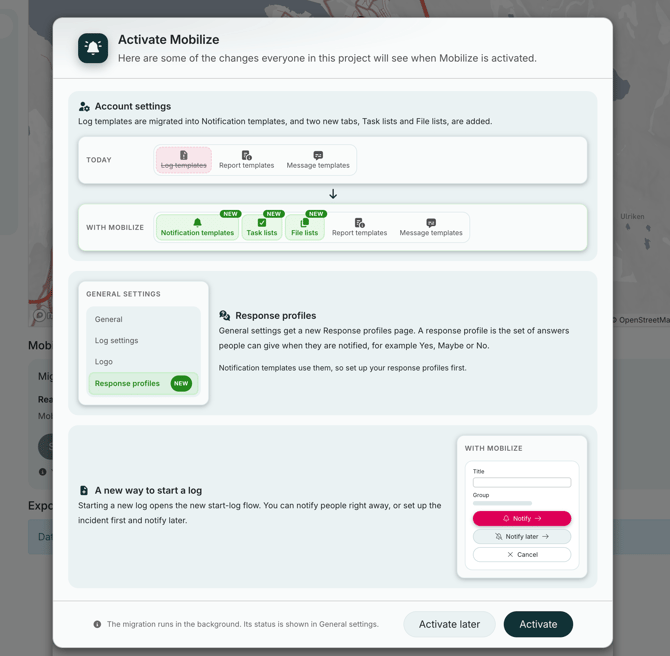
1. Account settings
Instead of needing to activate a whole package of notification text, teams, tasks and files when you start a log from a log template in RAYVN, you can now focus on starting the log with your notification text, and then adding tasks and files when you need them.
You can create specific lists of tasks/actions to take in specific situations, and have lists of files which may be relevant in different scenarios, or you can also categorize your files. If you want all your different call lists in a file list, you can create a specific list for that.
These files and tasks can be pulled in from any incident log that you operate in.
Its also important to note that none of your existing content will be removed.
The section of your log template that contained notification text and suggested team to notify, will be moved to a notification template, the task list you had in a log template will be moved to a task list, and the files attatched to your log template, will be added as a file list.
2. Response profiles
If you want your personnel to be able to respond with more detail than just "Yes" or "No" when you send them a notification from RAYVN, you can create specific, tailored options for them to reply with.
For example, if you need to know how people can help, you can offer "Yes, in person" and "Yes, online".
Response profiles are on a new page under General settings. Your notification templates can include a response profile also, so you can use specific profiles in specific scenarios.
3. Notify now, or notify later?
When something happens, starting a log should be quick. The new start-log flow lets you choose:
- Notify: alert your people right away.
- Notify later: set up the incident first, then add teams and notify people when you're ready to escalate.