
This page lists product updates for RAYVN: new features, improvements, and fixes. Entries are added as changes are released, newest first.
September 30, 2026 – v3.0.12
Improvements:
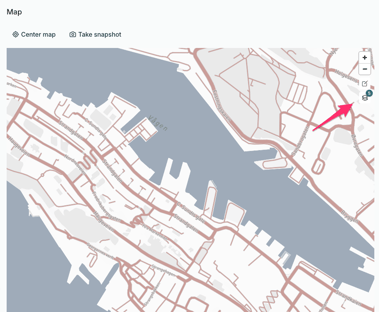
- The incident map can now show Norwegian maps from Kartverket, such as topographic maps and nautical charts. This requires the integration to be enabled on your account.
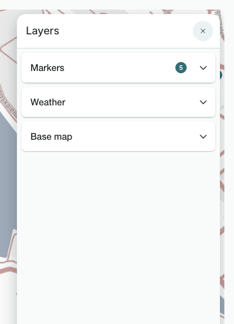
- All map layers are now gathered in one panel, opened from the layers button. Your choices are kept when you reload the page.
- Switching between many accounts is easier. Accounts are sorted alphabetically, and if you have more than 10 accounts, you can search for the one you need.
- Account settings are easier to use on smaller screens. The tabs stay at the top while you scroll, and lists and menus are shown in full.
- Long task template names and statuses are now shown in full instead of being cut off.
Fixes:
- You can no longer save changes in Account settings when a required field, such as a team name, is empty.
- Custom fields are now kept when contacts are moved to another group.
- The unsaved changes window and message confirmations in the log now appear in the correct language.
September 14, 2026 – v3.0.11
Improvements:
- The window for adding a team now adjusts to fit your screen. You can close it with the Esc key, and the buttons stay visible at all times.
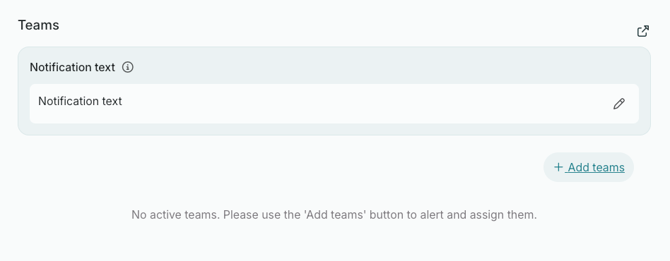
- The notification text box for teams now uses the full width of the window, making it easier to read and write longer texts.
Fixes:
- The "Next" button in for starting a crisis or exercise now works as expected. Previously, some users found that clicking it did nothing, which meant they couldn't start the crisis or exercise.
- Key events in the log are easier to spot again, with a clear border and background around the event.
August 27, 2026 — v3.0.10
Improvements:
- The Meetings tool is called "Meetings" again in Norwegian, instead of "Status meetings".
- Naming a new task is easier. The field grows as you type and is nearly full width. Save and cancel use the same round buttons as when adding a status, and "Add tasks from template" is now a link.
- The dialog for writing a log entry is now titled "New entry", matching the button that opens i
Fixes:
- "Open in separate window" shows only the tool you picked at full width, without the navigation, incident menu, log feed, or subincident panel. Meetings and the Overview now have the button too.
- The recipient list in message confirmation now scrolls, so you can read every recipient and see delivery statuses update live.
- Text in a report section is now visible in dark mode.
- "Post email to log" now works. It opens the "New entry" dialog prefilled from the email, and posts to the log the email belongs to.
- The "Contact list from other groups" heading in Account settings is now visible in dark mode.
- Searching for a tag while writing a log entry now shows the full list of matches, instead of being hidden behind other fields or cut off.
- The incident Overview now keeps every section (situation, description, name, status board) up to date.
August 19, 2026 — v3.0.9
Improvements:
- The log feed drawer can now be resized to a narrower minimum width, freeing up more screen space for the map and the rest of the incident overview on narrow screens.
Fixes:
- Large log entries no longer push the timestamp and buttons out of view, and the timestamp can now be edited directly even on small screens.
- The "Add person to team" dialog now fits the browser window, so the buttons stay visible and scrolling works properly.
- The "affected persons" popover on a subincident card now closes when you open a person from it, so it no longer floats on top of the edit dialog and blocks clicks.
August 17, 2026 — v3.0.8
Improvements:
- The notification message field in the Create incident and Create incident from template wizards now has a scrollbar. This makes it easier to see the whole text, so the content is no longer cut off.
- Pinned status names on the Overview status board are now clearly readable in dark mode.
- Scrollbars are now wider, easier to grab, and stay visible in dark mode.
Fixes:
- Incident Overview's "people notified" count now matches the Teams section
- Headings and field labels in personal information (Account Settings – Users, Responders, and Contacts) are now readable in dark mode
- Log entries are no longer cut off on narrow screens or at high zoom levels, so the edit menu and subincident badges stay visible
- The "+" buttons for adding a team or affected person in subincident popovers are now clearly visible in both light and dark mode
July 8, 2026
Improvements
- Improved the Aggregate Situation Report workflow to better align with customer requirements for shared templates across participants.
- Aggregate sections now merge and copy content from attached reports into normal editable sections.
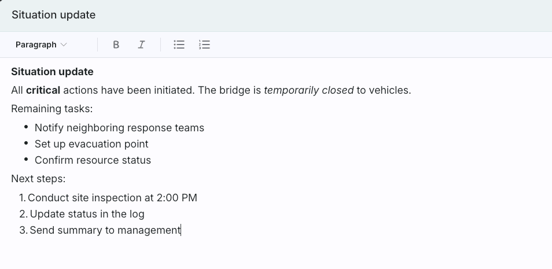
- Upgraded section editing with richer full-screen editing and improved formatting behavior.
- Added and stabilized markdown-based rich text support (headings, emphasis, ordered and unordered lists) with correct rendering in previews and report views.
- Improved handling of non-matching section headings with a clearer mapping dialog and stronger validation.
- Improved usability for long reports, including better navigation, state continuity, and more stable print output.
June 26, 2026 — v3.0.7
Improvements
- Incident cards now show who started the incident, also available as a column in table view.
-
When you request a status update from a stakeholder in the Status module, the response now appears in its own row. Click the dropdown arrow to expand the row and see their answer.

Fixes
- Fixed a layout issue where long section names in report templates pushed action buttons off screen. Names now wrap correctly, and the character limit is consistently set to 250 everywhere.
- Scrollbars are visible again across the incident view side panel, incident menu, main area, log feed, and subincident column.
June 3, 2026 — v3.0.6
Improvements
- Pinned statuses on the Overview status board now sort alphabetically by name.
- Overview loads noticeably faster on startup and reload.
Fixes
- Renamed the "Close log" button to "End incident" for clarity.
- Fixed an incorrect background color in dark mode on the incident details edit panel.
- The notification bell's "Filter" and "Mark all as read" buttons are now visible in light mode.