
When you open the RAYVN app with an active log, you will see the active log marked with the rooms that you are assigned to. Read more about rooms here.
When you open the active log, you will be taken to the log view. Above the log entries, you will see which room that you are in next to the "Main log" indicator.
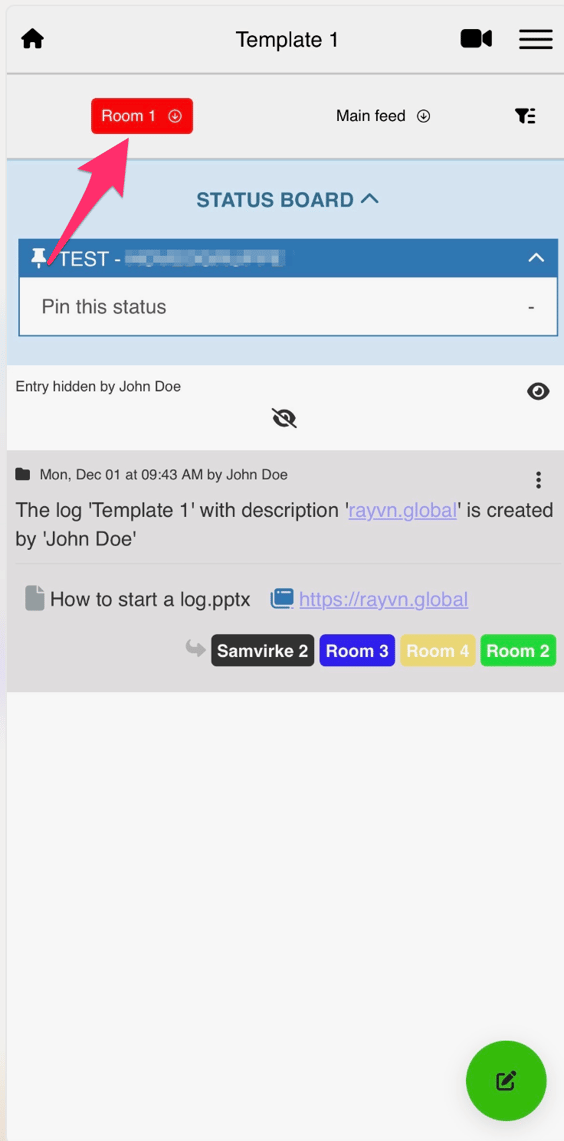
If you have been assigned to multiple rooms, you can tap on the room indicator, and you will then be able to choose which room you want to open. When you add text or images to the active log, the log entry will be added to the room you are currently in.

If you want to share any log entries, click on the arrow to the right in the log entry, and select which rooms you want to share the entry with. Sharing log entries between rooms works the same way in the app and the web version of RAYVN.
If you want to read more about rooms in the web version of RAYVN, click here.
If you want to read about setting up different rooms, click here.