
Team status gives you an instant overview of who's available to join the incident, and who isn't. Instead of spending time chasing down who received a notification, you can see it all in one place and start managing the incident right away. Once a log is created and notifications are sent out, RAYVN automatically tracks and categorizes everyone's responses for you.
You can find the team status if you click on "Teams" in your toolbar.
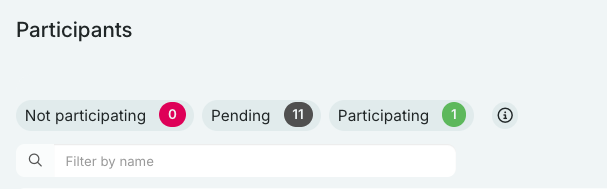
Users in the RED box have responded that they cannot participate in the log.
Users in the GRAY box have responded to the notification, but have not yet logged in.
Users in the GREEN box have accepted the notification and are active in the log.
This overview makes it easier for you to see how many people are participating or have said they will participate, and how many has declined. This helps you see if you have enough hands to manage the incident, or if you need to invite more teams.