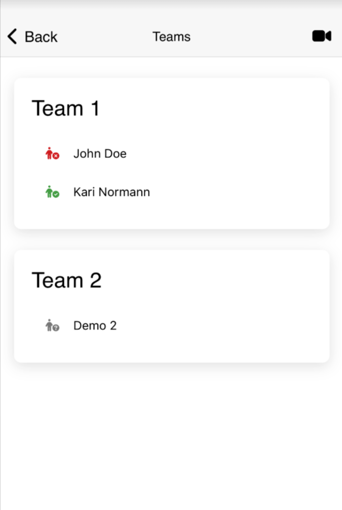
Team status gives you a quick overview of who is actually available and able to join the incident This makes it easy to see who you can count on.
If you want to view the status of the team members in a log in the app, you can do so by following these steps:
1. Start by opening the active log in the mobile app. Click on the navigation field in the upper right corner.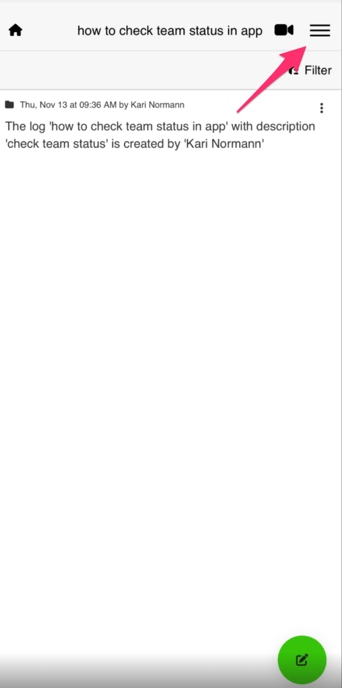
2. Select "Teams".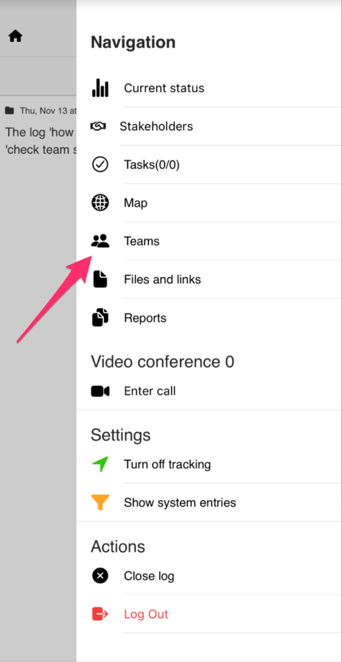
3. Here you can see the members of each team, and see the status for each member.
The different colors of each member are:
- GREY - Users with a grey symbol have received the notifications, but have not responded.
- RED - Users with a red symbol have responded that they cannot participate in the log.
- GREEN - Users with the green symbol have responded that they are active, and ready to participate.