
If you lose access to your old phone, change devices, or for any reason need to reset your multi-factor authentication, you can easily do this inside RAYVN as a Group- or Account administrator.
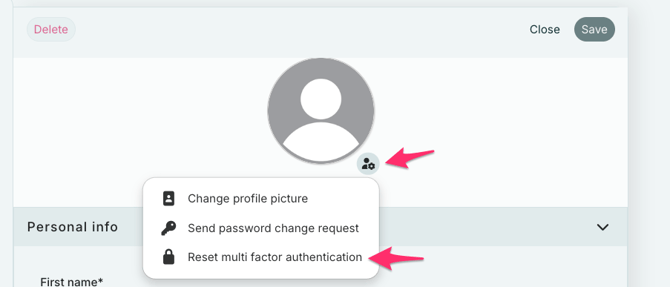
Steps to reset your MFA:
- Go to Account settings and open the profile of the user that needs the reset.
- On the right side of the name, click the person icon with a gear symbol.
- From the menu, select "Reset multi factor authentication".
-
The next time the user logs in to RAYVN, they will be asked to set up MFA again.
A new QR-code will be displayed.
Scan this code with your authentication app of choice (for example Google Authenticator, Microsoft Authenticator, etc.) on your new phone.
Once the new QR code has been scanned, your multi-factor authentication will be active again on your new device.