
With the Outlook Add-in, you can post an email from your Outlook inbox directly to a log in RAYVN. The email becomes a log entry with the correct date and time, and you don't have to copy and paste it yourself.
What you can do
- Choose the log, room and sub-incident the log entry is posted to.
- Edit the text before posting.
- Keep, remove or add attachments.
- Tag the log entry as Key event or Released information.
Before you start: add RAYVN to Outlook
- In Outlook, open Apps.
- Search for RAYVN and add the app.
You only need to do this once.
Post an email as a log entry
- Open the email you want to post.
- Click Apps in the email and select RAYVN.
- The first time, log in with your RAYVN account.
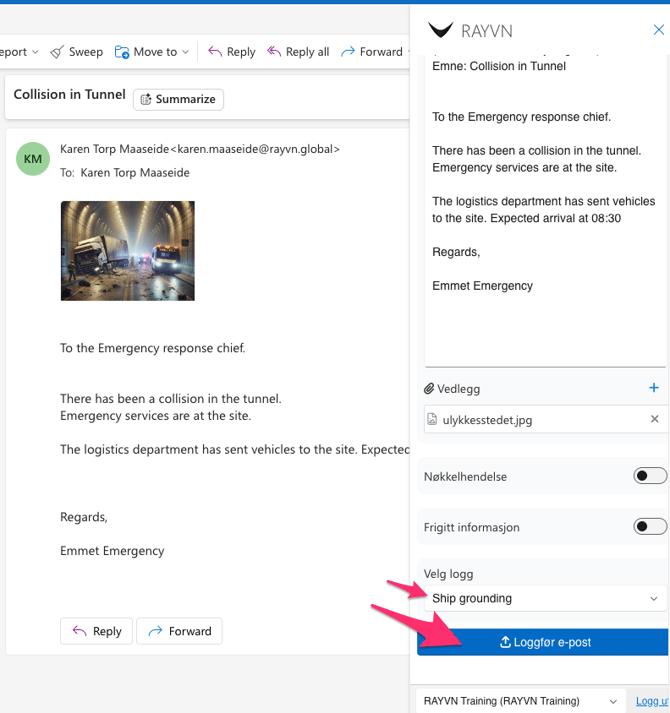
- Edit the text if needed.
- Check the attachments. Attachments in the email are included automatically. Remove the ones you don't need, or click + to add more.
- Add the Key event or Released information tag if relevant.
- Select the log, and the room or sub-incident if needed.
- Click Log entry.
The email now appears in the log feed of the log you selected.
Can't see RAYVN in Outlook?
Log out of Outlook and log back in. The RAYVN app should then appear.